



Php
The ET/BWMGR v8.0 user interface is built with php 7.4, and offers unprecedented flexibility in developing user applications that can interface with the Bandwidth Management Subsystems.
While you can certainly build your own apps from scratch, you can also utilize the "startup.php" to read the configuration, connect to the database and
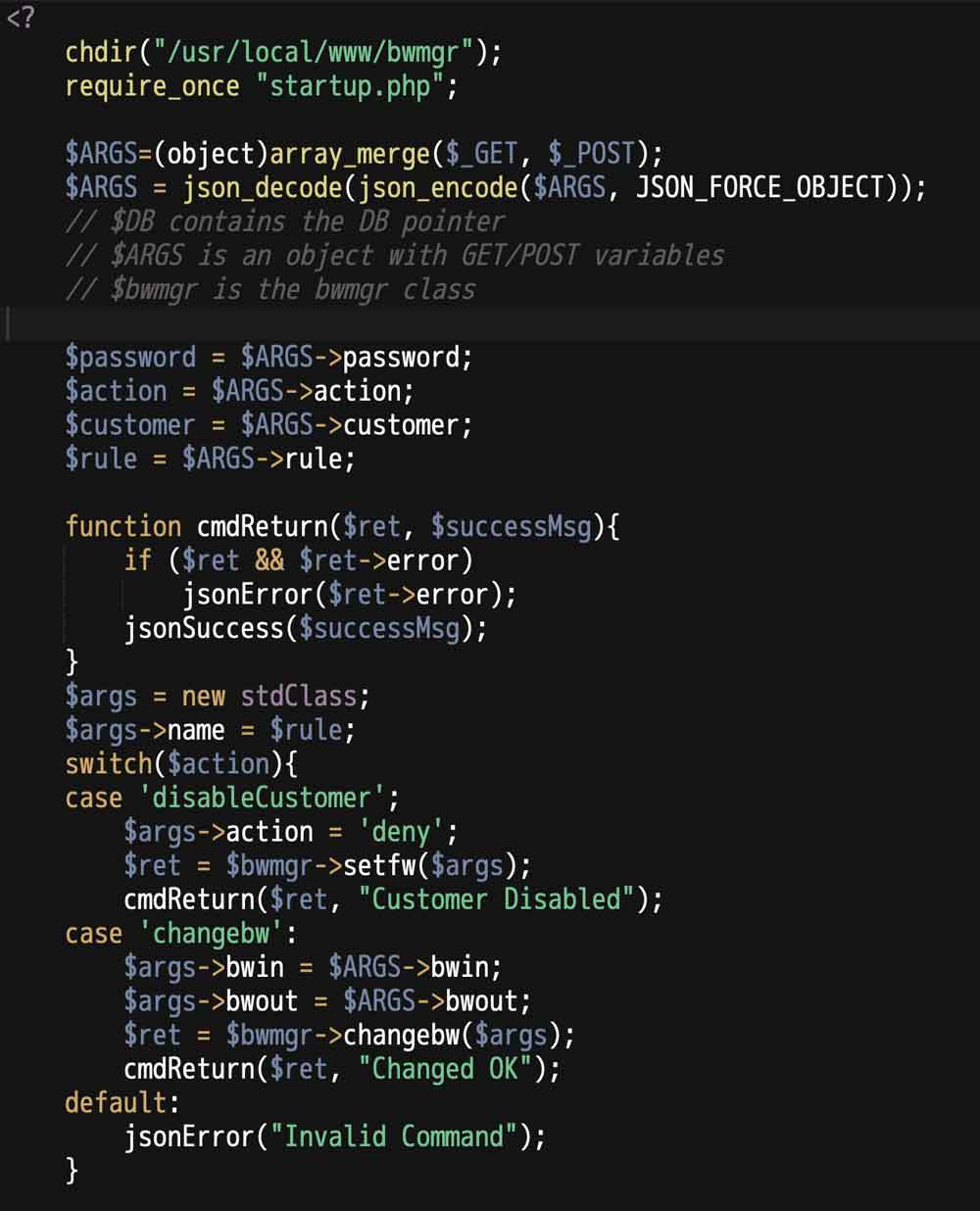
BWMGR API EXAMPLE
The example uses some of our JSON return functions, which are useful for returning information from a web based app. The JSON function all terminate the app with an exit call so they do not return.
jsonError($msg) : Returns an object with -> error set to message;
jsonReturn($obj) : Returns the object in JSON form
jsonSuccess($msg) : Return an object with ->success set to $msg
$DB - Database Class
$DB is a connected database; dbconnect() has already been completed with the parameters in the configuration file. Notable methods:$DB->getError()
Get the Error message for an opertaion
$DB->getFields($table)
$DB->getResults($query)
Returns an array of results for a quwery.
$DB->getRow($query)
Returns a single Row for a query. If multiple rows, the first row is returned.
$DB->getVar($query)
Returns a single variable; if multiple rows/variables the first variable from the first row iw returned.
$DB->insertID()
Returns the insertID for an insert query.
$DB->query($query)
Issues a query. Typically used for non-data queries. Returns 1 on success.
$DB->selectDB($dbase)
Issues a USE query
$DB->tableExists($table)
Check for table existense.
$bwmgr - bwmgr Class
The bwmgr class provides a complete interface to all information in the driver. You can get settings, rules and stats and you can also change settings and create rules.$bwmgr = new bwmgr();
$status=$bwmgr->status();
print_r($status)
stdClass Object
(
[version] => 5.2
[build] => 022
[bwmgr_running] => 1
[module_time] => 1451081059
[unburst] => 10
[track_all] => 1
[dns_count] => 0
[small_pkt_pri] => 0
[stats_period] => 5
[max_streams] => 50000
[hi_streams] => 1
[mem_used] => 4679536
[streams_in_use] => 0
[max_buffers] => 15000
[bufs_in_use] => 0
[high_bufs] => 0
[alerts_pending] => 0
[count_headers] => 0
[appliance_type] => R2400HL
[hyperthreading] => 1
[license] => 1408781910
[license_limit] => 1000
[expires] => 1451344400
[key_interface] => igb0
[sniffing] => enabled
[urlparams] => enabled
[boottime] => 1451125437
[cpu] => Intel(R) Xeon(R) CPU E3-1276 v3 @ 3.60GHz
)
With the API, you can easily add rules from a PHP application, without having to call a clunky CLI.
$args->ifname='em0';
$args->x = 100;
$args->name = 'AcmeCorp';
$args->bwprofile='Default''
$bwmgr->addrule($args);
Getting real-time statistics is always a challenge for user-level applications, but our API makes it easy.
$args->name="http";
$ret=$bwmgr->getstats($args);
print_r($ret);

stdClass Object
(
[protocol] => http
[stats] => stdClass Object
(
[cur_rx_bytes] => 48579
[cur_tx_bytes] => 165403
[cur_rx_packets] => 232
[cur_tx_packets] => 172
[cur_drops] => 0
[cur_seconds] => 2
[period] => 20
[tot_rx_bytes] => 113064518
[tot_tx_bytes] => 420473856
[tot_rx_packets] => 514614
[tot_tx_packets] => 473215
[tot_drops] => 0
[last_rx_bytes] => 45228
[last_tx_bytes] => 289216
[last_rx_packets] => 285
[last_tx_packets] => 275
[lastdrops] => 0
[bps] => stdClass Object
(
[bps_in] => 27752
[bps_out] => 94512
)

)

[cmd] => getstats
)
the name parameter can be any protocol, tag or rule. You can also specify an ifname (interface name) and index for rules that don't have names.
Event API
The Monitor generates events which can used by applications to generate actions. Events are generated every 5 seconds and can be pulled with the getMonitorEvents() function:$events = getMonitorEvents();
print_r($events->events);
(
[0] => Array
(
[timestamp] => 1451178422
[event] => HOST
[sport] => 0
[dport] => 0
[ip] => 17.1.1.32
[ip_dns] =>
[dst_ip] =>
[dst_dns] =>
[mac] => e8:ea:6a:06:1c:26
[hostname] =>
[dnsreq] =>
[agent] =>
[url] =>
[org] => Apple Inc.
[country] => US
[city] => Cupertino
)
[1] => Array
(
[timestamp] => 1451178422
[event] => HOST
[sport] => 0
[dport] => 0
[ip] => 17.1.1.30
[ip_dns] =>
[dst_ip] =>
[dst_dns] =>
[mac] => 00:e0:ed:1f:80:20
[hostname] =>
[dnsreq] =>
[agent] =>
[url] =>
[org] => Apple Inc.
[country] => US
[city] => Cupertino
)
)
The above example shows a new host discovery; the event includes the organization, Country and City from the database and the DNS if available. If a new DNS request is pending, a separate event will be generate when it is resolved.